
.png)
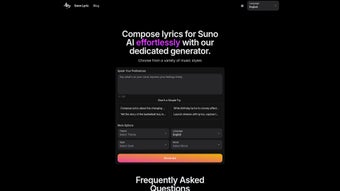
Description
Download Sono Lyric – AI‑Powered Lyrics Generator for Musicians
Overview
Sono Lyric is a cloud‑based, AI‑driven lyrics generator that transforms the often‑daunting task of songwriting into a smooth, almost playful experience. Designed for professional songwriters, independent producers, and hobbyist musicians alike, the platform lets you craft custom verses, choruses, and bridges in seconds. By simply entering or speaking a handful of preferences—genre, theme, mood, language, and even a short reference snippet—the underlying neural network produces coherent, rhyme‑aware lyrics that align with your creative vision. The service is built on a copyright‑safe model that draws only from public‑domain and properly licensed data, guaranteeing that every line you export is original and ready for commercial release. Multilingual support spans English, Chinese, Spanish, Hungarian, Polish, and Russian, opening doors for cross‑cultural collaborations without the need for translation tools. Whether you’re working on a pop anthem, a gritty hip‑hop track, or an indie folk ballad, Sono Lyric offers a “write‑once, use‑anywhere” workflow that lets you focus on melody, arrangement, and performance. The free tier provides generous access to core generation features, while an affordable commercial‑use license removes all restrictions for professional distribution, streaming, and print publishing. In short, Sono Lyric merges cutting‑edge artificial intelligence with an intuitive web interface, delivering a secure, constantly updated songwriting companion that works on any modern device.
Key Features, Installation & Compatibility
Feature Highlights
- Genre Flexibility: Pop, rock, hip‑hop, country, jazz, blues, electronic and more—switch styles on the fly.
- Thematic Diversity: Choose from love, adventure, heartbreak, empowerment, party, introspection, and dozens of other themes.
- Mood‑Based Generation: Adjust emotional tone—happy, sad, aggressive, relaxed—to match your track’s vibe.
- Voice Input: Speak ideas directly; built‑in speech‑to‑text converts spoken concepts into lyrical prompts.
- Multilingual Output: Generate lyrics in six languages, ideal for global collaborations.
- Customizable Length: Define verse‑chorus structures, line count, or total word count.
- Copyright‑Safe Engine: Trained on public‑domain and licensed data, ensuring output is free from infringement.
- Commercial‑Use License: Optional upgrade permits unrestricted use of lyrics in commercial releases, streaming, and print.
- Export Options: Download as plain text, PDF, or embed directly into popular DAWs via API.
- Secure Cloud Storage: Save drafts in an encrypted personal library for later editing or collaboration.
The feature set is complemented by a streamlined onboarding process that requires no traditional installation. Sono Lyric runs entirely in the browser, meaning you can start creating the moment you land on the official site. Because all heavy AI processing occurs on Sono Lyric’s secure servers, the client side remains lightweight, ensuring fast load times even on modest hardware.
Installation, Compatibility & How to Use
Web browsers on Windows, macOS, Linux, Android, and iOS are fully supported. Whether you prefer Chrome, Edge, Firefox, Safari, or Opera, the application adapts to the latest web standards, delivering a consistent experience across desktops, laptops, tablets, and smartphones. No downloads, no updates to manage—every improvement is pushed server‑side, so you always work with the newest AI model.
Step‑by‑Step Guide
- Sign Up / Log In: Register with an email address or use Google/Facebook single‑sign‑on. The process takes under a minute.
- Select Creation Mode: Choose “Type” for manual prompt entry or “Speak” to dictate ideas.
- Set Parameters: Pick genre, theme, mood, language, and desired length. Optionally upload a reference lyric snippet for style guidance.
- Generate: Hit “Compose” and watch the AI produce multiple verse‑chorus variations within seconds.
- Edit & Refine: Use the built‑in rich‑text editor to tweak phrasing, swap words, or rearrange sections. You can ask the AI to re‑generate specific lines if needed.
- Export or Save: Download the final lyrics, store them in your encrypted cloud library, or copy directly into your DAW via the API.
For power users, creating a desktop shortcut on Windows or macOS provides one‑click access to the web app, while mobile users can add a home‑screen shortcut for instant launch. Because the platform is entirely cloud‑based, you never have to worry about compatibility issues after an operating‑system upgrade—your projects remain safe and accessible.
Pros, Cons, FAQ & Professional Review
Pros
- Instant lyric generation saves hours of brainstorming.
- Supports a wide range of genres, moods, and languages for versatile creativity.
- Voice‑to‑text input creates a natural, hands‑free workflow.
- Free tier offers generous access; paid commercial license is reasonably priced.
- Secure cloud storage protects drafts and ideas.
- API integration enables seamless workflow with major DAWs.
Cons
- AI may produce clichés if prompts are too generic.
- Requires an internet connection; offline usage is not possible.
- Advanced customization such as strict rhyming schemes is still in beta.
- Full royalty‑free usage requires a commercial license.
Frequently Asked Questions
Is Sono Lyric really free to use?
Yes, the core lyric‑generation features are free. A paid subscription unlocks commercial‑use rights, higher‑resolution exports, and priority support.
Can I generate lyrics in languages other than English?
Absolutely. Sono Lyric currently supports English, Chinese, Spanish, Hungarian, Polish, and Russian, with plans to add more languages in future updates.
How does the AI ensure the lyrics are copyright‑safe?
The underlying model is trained on public‑domain texts and licensed datasets. Generated output is considered original, and Sono Lyric includes a built‑in disclaimer confirming that users own the rights to the lyrics they export.
Do I need a powerful computer to run Sono Lyric?
No. Because the heavy AI processing occurs on Sono Lyric’s servers, any device with a modern web browser and an internet connection can handle the workload.
Can I integrate Sono Lyric with my DAW workflow?
Yes. Exported lyrics can be saved as plain text or PDF, and the platform also offers an API that allows direct insertion of generated verses into popular DAWs such as Ableton Live, Logic Pro, and FL Studio.
Professional Review
Sono Lyric delivers on its promise of effortless lyric creation. The AI’s ability to grasp nuanced thematic cues and translate them into coherent verses is impressive, especially for a free web service. While occasional generic phrasing appears, the built‑in editing tools let creators refine the output quickly. Its multilingual support and speech input set it apart from many competitors, making it a valuable addition to any songwriter’s toolkit. Overall, the balance of free features and affordable commercial licensing positions Sono Lyric as a must‑try for both hobbyists and professionals.
Rating: 4.5/5
Conclusion & Call to Action
If you’ve ever stared at a blank page waiting for the perfect line, Sono Lyric is the catalyst that can turn frustration into inspiration. Its blend of genre depth, mood control, multilingual reach, and voice input creates a uniquely versatile lyric generator that fits into any modern music‑making workflow. The free tier lets you test the platform without commitment, while the commercial‑use license removes all barriers for serious releases, ensuring your lyrics are royalty‑free and ready for distribution on streaming services, physical media, or print. With secure cloud storage, automatic updates, and seamless DAW integration, Sono Lyric becomes more than a novelty—it evolves into a reliable partner for every stage of the songwriting process.
Ready to supercharge your songwriting? Download Sono Lyric today and start crafting lyrics that resonate, no matter the language or style. Join thousands of musicians who have already discovered a faster, smarter way to write songs, and let the AI do the heavy lifting while you focus on melody, performance, and creative expression.
Guides & Tutorials for Sono Lyric
How to install Sono Lyric
- Click the Preview / Download button above.
- Once redirected, accept the terms and click Install.
- Wait for the Sono Lyric download to finish on your device.
How to use Sono Lyric
This software is primarily used for its core features described above. Open the app after installation to explore its capabilities.
User Reviews for Sono Lyric 0
No reviews found




